.webp)
Sommaire
Points essentiels
- Le serveur MCP de Pigment combine la rapidité de l’IA avec la gouvernance de la planification en ancrant Claude dans les métriques, hiérarchies et modèles Pigment en direct tout en respectant les autorisations.
- Au niveau 1, Claude répond avec un accès gouverné aux chiffres réels de Pigment, en évitant les exportations obsolètes ou les résultats supposés.
- Au niveau 2, Cowork se connecte à Pigment via MCP en tant que frontend personnalisé où chaque entrée de prévision reste traçable, auditables, et liée à une source unique de vérité.
- Au niveau 3, Claude Code modifie des applications Pigment existantes ou en crée de nouvelles, tandis que l’agent Modeler de Pigment accélère déjà la création de modèles au sein de la plateforme.
- Le Pigment Harness standardise les implémentations grâce à un dépôt versionné unique de compétences, huit agents spécialisés, ainsi que des modèles et commandes de projet.
- Le processus de création s’étend sur six phases plus deux agents continus, avec un nombre d’ancrage défini lors de la conception et une validation humaine requise avant toute mise en production.
- Pigment rapporte des résultats précoces qui réduisent des workflows prenant auparavant des semaines à aussi peu qu’une semaine sans sacrifier la précision, les autorisations ou la traçabilité.


Comme tout le monde en ce moment, notre équipe apprend à travailler dans un monde où l’IA redéfinit, semaine après semaine, le champ des possibles. Il est tentant de se concentrer sur la vitesse, mais ce n’est pas tout l’enjeu de la planification. Générer un modèle en quelques minutes ne sert à rien si vous ne pouvez pas faire confiance aux chiffres, ni retracer leur origine.
Nous avons donc travaillé sur une approche qui permet d’avoir les deux : la vitesse rendue possible par l’IA et la gouvernance indispensable à la planification. Le serveur MCP de Pigment en est le point central. Ce qui suit présente notre réflexion actuelle, ainsi qu’un framework sur lequel nous observons déjà de premiers résultats concrets.
Un principe revient sans cesse dans notre réflexion : chacun doit pouvoir travailler comme il le souhaite, dans l’outil le plus adapté à la tâche. Les trois niveaux ci-dessous relèvent moins d’une roadmap produit que d’une cartographie de ce que le MCP peut permettre : poser de meilleures questions, puis aller jusqu’à construire des applications complètes.
“Pigment montre ce qui devient possible lorsque l’IA devient un partenaire de la planification stratégique. En tant que partenaire technologique et client de Pigment, nous constatons directement comment leur approche, qui connecte les données de planification à Claude via leur serveur MCP, permet aux équipes de se concentrer sur les décisions stratégiques plutôt que sur la manipulation des données.”
Guillaume Princen, Head of EMEA, Startups, Digital Natives, and Mid Market, Anthropic
Niveau 1 : Claude + Pigment MCP
Commencez ici.
Le MCP rend les données et la logique de Pigment accessibles à Claude, quel que soit le format dans lequel vous l’utilisez. Claude bénéficie d’un accès gouverné à vos métriques, hiérarchies et modèles en temps réel, avec le respect de vos permissions à chaque étape. Les réponses obtenues sont ancrées dans vos chiffres réels, et non dans un export obsolète ou une estimation.
Niveau 2 : utiliser Cowork comme interface front-end pour Pigment
Connectez un artefact live dans Cowork à Pigment via le MCP, et vous obtenez une interface front-end personnalisée au-dessus de vos données de planification. Soumettez une prévision depuis une interface conçue pour l’usage métier, sans perdre ce qui rend Pigment unique : chaque saisie reste traçable, auditable et rattachée à une source unique de vérité.
La flexibilité d’un outil sur mesure, avec la rigueur d’une plateforme de planification.
Niveau 3 : construire et enrichir des applications avec Claude Code
Si l'Agent Modélisateur Pigment accélère déjà la construction de modèles dans Pigment, vous pouvez aussi piloter Claude Code depuis la ligne de commande pour modifier une application Pigment existante ou en créer une nouvelle de zéro.
Chacun de ces outils est puissant individuellement. Pour livrer un engagement Pigment complet, nous réunissons l’ensemble des produits Claude dans un même système. Nous l’appelons le Pigment Harness.
Pigment Harness
Pigment Harness est le point de départ commun de chaque implémentation Pigment menée par notre équipe. Skills, Agents, Templates et Commands sont tous versionnés dans un même référentiel, clonés au démarrage de chaque projet, puis enrichis après chaque engagement. Cela permet une livraison plus rapide, avec un niveau de qualité constant. Et comme les enseignements sont réintégrés à chaque fois, les gains s’accumulent.
Voici ce qu’il contient :
- Skills
Le savoir-faire versionné issu des projets précédents : modélisation, formules, performance, droits d’accès, conception de boards… le tout packagé pour que Claude puisse l’appliquer à la demande. - Agents
Huit spécialistes, chacun cadré sur une partie spécifique de la construction. Six correspondent à une phase précise, deux interviennent en continu. - Templates et commands
Un socle projet pour structurer la mémoire, les décisions et la roadmap, ainsi que les commandes qui lancent chaque engagement.
Un Architecte Solution Pigment pilote l’engagement de bout en bout : cadrage, utilisation de Claude Code, revue de chaque changement et gestion de la relation client.
Claude Code orchestre les agents du Harness, en exécutant chacun d’eux à partir des skills versionnés et des patterns validés sur les projets précédents.
Et le Serveur MCP Pigment soutient l’ensemble, en authentifiant chaque appel et en appliquant les permissions de workspace côté serveur.
L’équipe d’agents ressemble à ceci :
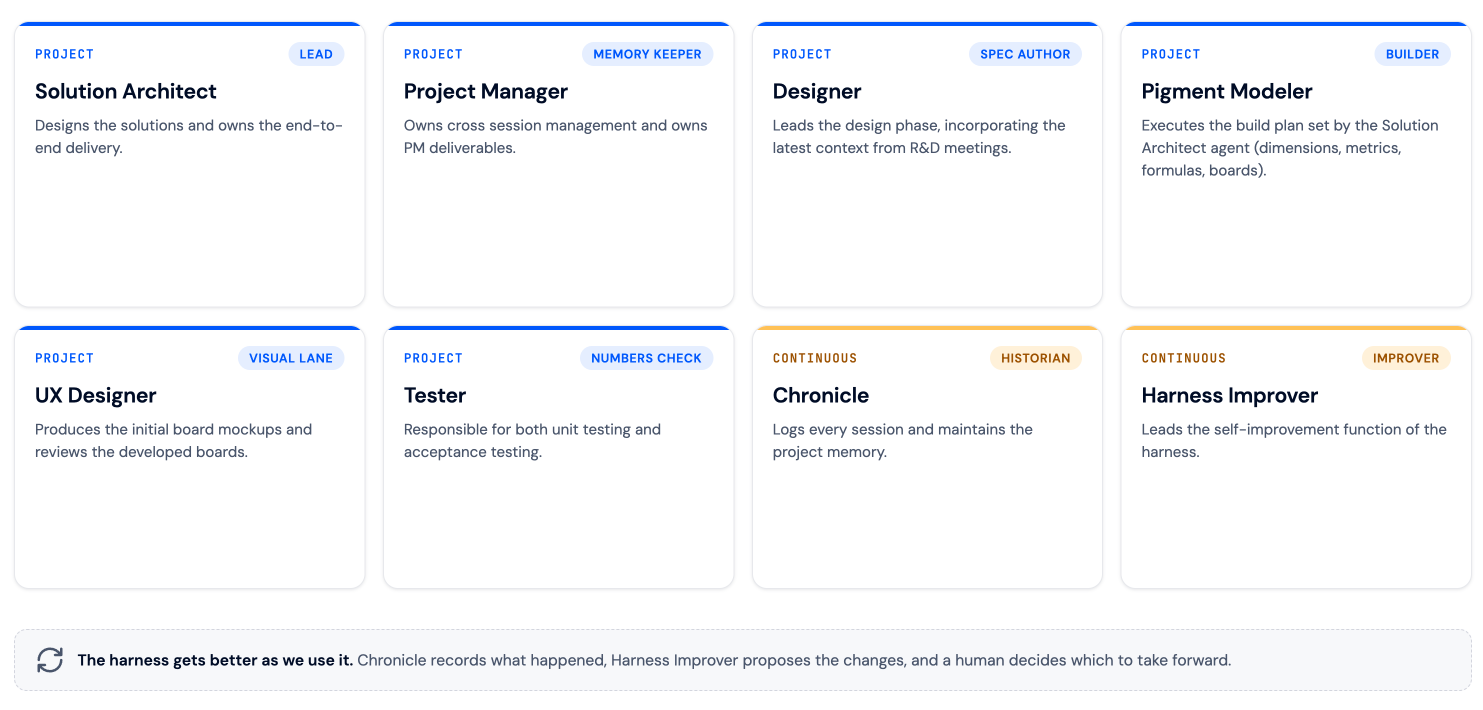
La construction se déroule en six phases, avec deux agents qui travaillent en continu en parallèle.
Dès le début, la phase de design fixe un « chiffre d’ancrage » : une cible unique et partagée, à partir de laquelle toute la construction est mesurée. Cela évite que le modèle ne s’éloigne progressivement de ce qu’il devait livrer.
- Phase 1 - Onboarding
Structurer le projet, mobiliser l’équipe et aligner le périmètre. - Phase 2 - Design
Document de design, critères d’acceptation, architecture et maquettes. - Phase 3 - Build
Construire use case par use case, avec des validations automatisées à chaque étape. - Phase 4 - Test
Vérifier l’application par rapport aux maquettes et aux critères d’acceptation. - Phase 5 - Launch
Déployer l’application pour un usage en production. - Maintenir (en continuu)
Journaliser chaque session et proposer des améliorations du Harness, soumises à validation humaine. Le fil conducteur est le même partout : un humain revoit chaque changement, le chiffre d’ancrage maintient la construction alignée sur l’objectif, et rien n’est livré sans validation.
Le fil conducteur est le même partout : un humain revoit chaque changement, le chiffre d’ancrage maintient la construction alignée sur l’objectif, et rien n’est livré sans validation.
Ce qu’il faut retenir
Voilà où nous en sommes aujourd’hui, et nous produisons des résultats de qualité dans des délais radicalement plus courts. Le workflow décrit ci-dessus aurait auparavant nécessité plusieurs semaines de travail avant l’IA ; nous le réalisons désormais en parfois une seule.
La vitesse fait la une, mais ce dont nous sommes le plus fiers, c’est de ne pas avoir eu à faire de compromis pour l’obtenir. Les chiffres restent fiables, les permissions restent en place, et chaque donnée peut toujours être retracée jusqu’à sa source.
Pour en savoir plus sur le MCP, l’IA et Pigment, demandez une démo auprès d’un membre de notre équipe (humaine).